Friday, February 24, 2012

Aegif releases Alfresco checkin/checkout plugin, open source


From an intranet office user's point of view, documents stored in Alfresco usually appear as a shared drive. The user opens its files manager, and can see for instance a "W:" shared drive below their "C:" drive. Employees on a business trip or working from home can achieve the same result by clicking a link to Alfresco's WebDAV interface, which also works in the file explorer.

Alfresco provides a convenient way to checkin/checkout documents, you just drop a file on "CheckInOut" to start modifying it, or push your modifications to the repository.

Problem: It only works on Windows.
That's why I started a project to have the same level of user-friendliness on Mac and Linux.

I finished implementing the Linux one, here is a short video showing it in action:

Aegif released this plugin as Open Source.

It runs on Gnome Nautilus, the default file browser in RedHat, Ubuntu, and most other Linux distributions. Internally, it uses the CMIS protocol to check out documents.

The source code is available so don't hesitate to modify it.
Also, we must find a way to write a plugin for MacOsX's Finder, but its close source nature is making it less straightforward. Any idea/contribution is welcome!
Nicolas Raoul

Friday, February 17, 2012

AlfrescoのLDAP連携

こんにちは。てらしたです。

前回からかなり日があいてしまいました。前回の最後に、"次回は、Apache Directory Studioを使って簡単なディレクトリデータベースを作成する方法を紹介したいと思います。"と書いておいてアレなんですが、これに関してはググればけっこう解説記事が出てくるのでやっぱりやめて、今回はAlfrescoのLDAP連携の方法を紹介したいと思います。

  1. <tomcat_dir>/shared/classes/alfresco/extension以下に次のような階層でディレクトリを作成します。
    $ mkdir -p <tomcat_dir>/shared/classes/alfresco/extension
    /subsystems/Authentication/ldap/ldap-test
    
    ここで、最後の"ldap-test"というディレクトリ名は、例えば複数のLDAPサーバと連携する必要がある場合にそれぞれを区別するために付ける名前なので、どのような名前でもかまいません。
  2. このディレクトリに以下のようにcommon-ldap-context.xml、ldap-authentication-context.xml、ldap-authentication.propertiesの3つのファイルをコピーします。
    $ cp <tomcat_dir>/webapps/alfresco/WEB-INF/classes/alfresco
    /subsystems/Authentication/common-ldap-context.xml 
    <tomcat_dir>/shared/classes/alfresco/extension/subsystems
    /Authentication/ldap/
    
    $ cp <tomcat_dir>/webapps/alfresco/WEB-INF/classes/alfresco
    /subsystems/Authentication/ldap/ldap-authentication-context.xml 
    <tomcat_dir>/shared/classes/alfresco/extension/subsystems
    /Authentication/ldap/ldap-test/
    
    $ cp <tomcat_dir>/webapps/alfresco/WEB-INF/classes/alfresco
    /subsystems/Authentication/ldap/ldap-authentication.properties 
    <tomcat_dir>/shared/classes/alfresco/extension/subsystems
    /Authentication/ldap/ldap-test/
    
  3. コピーしたldap-authentication.propertiesを編集します。書き換える必要があるのは主に以下の部分です。
    # LDAPサーバのURLとポート
    ldap.authentication.java.naming.provider.url=ldap://127.0.0.1:389
    
    # LDAPサーバに接続するLDAPユーザの識別名
    #(OpenLDAPの場合はslapd.confにrootdnで指定した識別名)
    ldap.synchronization.java.naming.security.principal=cn\=Manager,
    dc\=aegif,dc\=jp
    
    # 上記のユーザのパスワード
    #(OpenLDAPの場合はslapd.confでrootpwに設定した値)
    ldap.synchronization.java.naming.security.credentials=secret
    
    AlfrescoにはLDAP連携の機能として、ユーザ認証をLDAPサーバに委譲する「認証」と、ユーザ情報をLDAPサーバからAlfrescoにインポートする「同期」の2種類が用意されています。認証を委譲する場合の設定箇所は以下の部分です。
    # 認証時のユーザ名のフォーマット
    #(%sの部分にログイン画面でユーザが入力したIDが入ります)
    ldap.authentication.userNameFormat=uid=%s,ou=users,dc=aegif,
    dc=jp
    
    LDAPサーバからユーザ情報を同期させる場合の設定箇所は以下の部分です。ここでは省略していますが、グループを同期させる場合はグループの同期設定もどうファイル内で設定します。
    # ユーザのobjectclass
    ldap.synchronization.personQuery=(objectclass\=inetOrgPerson)
    
    # ユーザの検索ベース
    ldap.synchronization.userSearchBase=ou\=users,dc\=aegif,dc\=jp
    
    # Alfrescoユーザの「ユーザID」に対応させるアトリビュート
    ldap.synchronization.userIdAttributeName=uid
    
    # Alfrescoユーザの「名」に対応させるアトリビュート
    ldap.synchronization.userFirstNameAttributeName=givenName
    
    # Alfrescoユーザの「姓」に対応させるアトリビュート
    ldap.synchronization.userLastNameAttributeName=sn
    
    # Alfrescoユーザの「メールアドレス」に対応させるアトリビュート
    ldap.synchronization.userEmailAttributeName=mail
    
  4. alfresco-grobal.propertiesを編集して、認証のchainの設定を行います。ここで、"ldap-test:ldap"のldap-testの部分は手順1で付けたディレクトリ名と一致している必要があります。
    authentication.chain=alfrescoNtlm1:alfrescoNtlm,ldap-test:ldap
    
  5. Alfrescoを起動します。
環境によって異なる部分も出てくると思いますが、基本的な設定方法は以上です。手順3で編集したldap-authentication.propertiesには他にも設定項目が細かく用意されており、環境に合わせて柔軟に設定を変えることができるので、色々試してみていただければと思います。

Friday, February 3, 2012

TMX(翻訳メモリデータ規格)の紹介

はじめまして! hayashiです。

一介の語学マニアとして「翻訳は休憩」という標語を唱えているせいか、社内の翻訳業務に携わる機会が多々あります。オープンソースという環境も手伝っているかもしれません。

業務として(主にIT系の)色々なドキュメントを翻訳していく中で、翻訳の効率化、訳の一貫性、ナレッジ管理、メソドロジなどのTo Beについて個人的に考えることもあるのですが、その前提としてまずは、翻訳作業を取り巻くIT環境について考察していこうと思います。初回のテーマは「TMX(翻訳メモリデータ規格)」についてです。
[翻訳メモリとは] 
TMXについて説明する前に、「翻訳メモリ」という言葉を説明します。
翻訳作業を取り巻くIT環境といっても、さまざまな側面がありますが、その中でもCAT(Computer Assisted Translation)と呼ばれる翻訳支援の仕組みがあり、その中心として「翻訳メモリTranslation Memory」というものがあります。翻訳をメイン業務として行っている会社・個人では翻訳メモリの使用はほぼ必須となっている感がありますが、それ以外の業界にとってはかなり馴染みの薄い分野なのではないでしょうか。

翻訳メモリとは、一言で言えば翻訳用の辞書みたいなもので、Wikipediaによれば、

「原文と翻訳文を一対としてデータベース化し、その内容を自動的に繰り返し利用することで翻訳を支援するソフトウェアである。」


翻訳メモリは、翻訳を仕事とする人の業務の効率化と質の向上を支援するためのソフトウェアである。「翻訳メモリ」は厳密には原文と訳文のデータベースを指し、それを利用するソフトウェアは「翻訳メモリ ツール」と呼ばれる。「翻訳メモリ ツール」のことを「翻訳メモリ」と呼ぶことも多い。


とあります。
私自身はふだんOmegaTというオープンソースの翻訳メモリツールを使用することが多いです。

対照的な概念として挙げられる自動的な機械翻訳と異なり、翻訳メモリは登録されたメモリに或る程度マッチする訳例を提示するだけで、最終的には翻訳者が手動で訳を確定・補完する必要があります。

翻訳メモリツールを使った翻訳のメリットとしては、以下のようなものが考えられます。
・効率化
同じ(あるいは似ている)訳語を手作業で打ち込まない。DRYの精神。
なお、翻訳会社によっては翻訳メモリがカバーできない範囲を見積もりの基準にすることもあります。
・一貫性
同一のフレーズに対する訳の一貫性が保たれる。特に複数の翻訳者が関わる時など有効。
・専門性
業界ごとの専門用語に特化した翻訳メモリが作成できる。普通の辞書だと様々な訳から適切なものを選択するのに時間が掛かるor訳が見つからないことがある。
・ナレッジの蓄積 
実績として登録された訳例自体が翻訳メモリを育てていくので、上手い訳がナレッジとして蓄積される。
・様々なファイル形式に対応
ツールにより対応するファイル形式は異なるが、XML形式で記述される翻訳メモリを通じて、様々なファイル形式のままで読込・出力が可能。


[TMX 1.4bの仕様について]
(広義の)翻訳メモリツールの多くでは、(狭義の)翻訳メモリデータのデファクトスタンダードな仕様としてTMX(Traslation Memory eXchange)というフォーマットが利用されており、翻訳メモリデータの交換が可能です。各翻訳メモリツールではこの翻訳メモリデータに対してインポートルーチン/エクスポートルーチンを通じて処理を行います。

TMXの仕様はLocalisation Industry Standards Association (LISA)という団体によって定められており、現在は1.4bというバージョンが最新のようです(2004年4月リリース)。

TMX1.4bの仕様は現在なぜかLISAのページではリンク切れで閲覧できない状態ですが、以下のページが原文をLISAから複製しています。
http://www.gala-global.org/oscarStandards/tmx/

TMX1.4bの仕様全文を日本語に翻訳したものはないようで、またTMXを紹介する記事も大変少ないため、上記ページをもとに1.4bの仕様を現在hayashiが鋭意翻訳中ですが(またこのブログでお知らせします!)、大まかにその特徴を説明すると、

・XMLベースのオープンな規格であり、メモリデータの実体は原文に対してタグでマークアップしたデータになる。
・TMXのタグには大きく分けて構造要素とインライン要素の2種類がある。
・構造要素は、原文の分節化に使用される。=> Level 1 実装
・インライン要素は、原文自体がHTMLなどのマークアップ言語である場合の原文のタグに対するメタタグとして使用される。そのためツールの側では、原文のマークアップ構造を保ったまま翻訳ファイルを生成することができる。=> Level 2 実装

TMXによるマークアップの使用ケース例:
・翻訳ユニット(訳語のペア)-> 翻訳ユニットバリアント(各国語での訳)-> セグメント(翻訳対象である任意の分節)、などを構造化する
・ペアになっている原文の開始タグ・終了タグをTMXのタグでマークする
・原文タグの属性が持つ文字列(<a>タグのtitle属性など)をマークする
・原文と訳文で、語順が変わってしまった単語同士をタグの属性を通じて照応させる
 [英語]The black(黒い) cat(猫) eats. ⇔ [仏語]Le chat(猫) noir(黒い) mange.


TMXに準拠したデータの実例として、Alfrescoのローカライズに使われたと思われる翻訳メモリデータが見つかりましたのでリンクを貼っておきます。翻訳メモリがどんなデータになるか、雰囲気が掴めるかと思います。

http://forge.alfresco.com/plugins/scmsvn/viewcvs.php/3.2/Explorer/explorer-level2.tmx?root=languagefr&view=markup


TMX仕様を興味を持って調べ始めた動機の一つとして、翻訳メモリを訳語ごとの文脈(どの業界のドキュメントか、IT系のドキュメントであればそれがメニューバー項目なのか警告メッセージなのか、など)に関連づけて運用することができないか、という考えがありました。
しかしTMXの仕様を見る限り、訳語ペアのセマンティックな属性を指示するようなものは無いようです。
実際にも、文脈に応じた翻訳としては、対象業界ごとの専門辞書を切り替えて使うのが普通のようですが、これだと粒度が粗すぎる事があるのでは、と思っています。(反面、粒度を細かくしすぎると手数が増えて面倒になるきらいがありますが)

このあたりについても、今後触れていく予定です。

Thursday, February 2, 2012

Fix the "Enter at least 1 character(s) to search" problem in Alfresco Share


Alfresco Share is a great ECM web application, but there is one detail that annoys all users, and here is how to fix it.

The problem: when clicking "Search" in a user/group selection dialog (for instance when creating a workflow), the following message appears: "Enter at least 1 character(s) to search". Which means that if you don't remember the name of the group, you have to try all letters: a,b,c,... hoping to find it. This is an incredible waste of time, and impossible to do in Japanese.

A trick is to enter an asterisk * (or "name:*" in some cases), but it does not work on all dialogs, and it is not user-friendly.
So here is how to fix the problem, and make all results appear when you click "Search":
  1. Stop Alfresco
  2. Open file tomcat/shared/classes/alfresco/web-extension/share-config-custom.xml
  3. At the end of this file, just before "</alfresco-config>", add this XML.
  4. Start Alfresco again.
And now the problem should be fixed!
Same message in other languages: Saisir au moins 1 caractère(s), 1文字以上入力してください, Geben Sie mindestens 1 Buchstaben ein, Immettere almeno 1 caratteri, Introduzca al menos 1 caracter(es).
Credits: Mike H.
Nicolas Raoul

Tuesday, January 31, 2012

Kakasi-java: born again

The Japanese language has several symbols, including kanji and hiragana/katakana. In software, we sometimes need to switch a text from one system to the other, and it is difficult.

Kakasi and MeCab are Open Source libraries dedicated to the problem of converting kanji to hiragana or katakana. For instance they can transform "国際財務報告基準" to "こくさいざいむほうこくきじゅん" or even to "kokusaizaimuhoukokukijun". In clear, it transforms logograms (symbols with multiple possible readings) to syllables.
That is very tricky, because for instance "経緯" can be transformed to "keii", but also to "ikisatsu" depending on the context or speaker. Kakasi sometimes gets it wrong, but usually it is not that bad. MeCab is actually better at that.

Yesterday I decided to add a "furigana" feature to my Android flashcards app. Furigana helps people read difficult kanjis, they are used a lot in mass media: books, newspapers, signs, advertisements.
Kakasi and MeCab are both conversion tools, but their internal algorithms are very different, leading to different speed/quality/simplicity characteristics. Before running to MeCab, I decided to also give Kakasi a try.

Unfortunately, Kakasi is written in C, and thus not easy to run on Android. Porting from C to Java would be possible, but before doing it I had to make sure nobody had ported it already. After multiple searches, I finally found a tar file of the blog of Kenichi Maehashi, saying "現在どこからも入手できないようです". In clear: Kakasi-java can not be found anymore on the Internet, so he uploaded the 0.4 version he miraculously found in his backups.

To make improvements and fixes possible, I took the source, compiled, tested it, wrote a little README file and created a project for it on GitHub. Code contributions are welcome :-)

The best would be a Java port of MeCab, but that does not seem to exist. MeCab has a Java binding, but it is not 100% Java, requiring JNI calls, which is not a great idea for Android.
Nicolas Raoul

2016 update: I just created Jakaroma, its kanji transliteration is much more accurate so please use it instead of Kakasi-java. It is also open source.

Monday, January 30, 2012

Templated nodes in Alfresco 4


In the new Alfresco 4, you can now easily use document templates.
Templates are convenient for forms that employees must fill often, for instance.
Another example: here at Aegif we often write new contracts, always based on the same template.
In this article I explain how to create and use a template in Alfresco.
First log in Alfresco Share as admin, and click the repository icon:

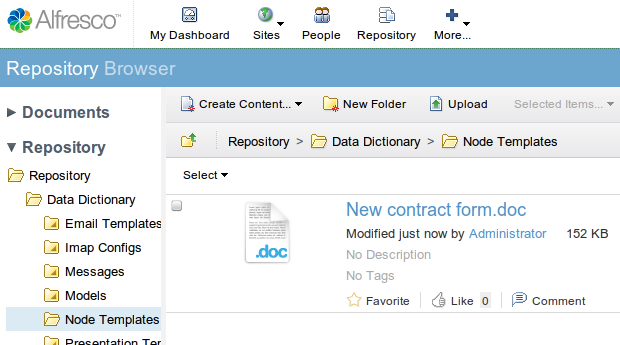
Go to the "Data dictionary" folder, then "Node templates" folder, and upload your template:


That's all!
To use it, click "Create content..." then "By Templated Node...", and you can select a template:


The template is then copied to the current folder, and you just have to rename it.

More technical details:

  • Can be used to easily create nodes with a custom content model.
  • Convenient for nodes with a particular set of aspects and properties.
  • Node templates must me created by an administrator (or someone who has access to the data dictionary), and are usable by everyone.
  • I haven't tried but I guess you can use permissions to show a particular template only to a particular group of users.
  • I will have to check whether associations are preserved or not.
  • As I reported on JIRA, folder hierarchies can not be used as templated nodes yet.
Do you know any trick with templated nodes? Let us know in the comments :-)
Nicolas Raoul

Keywords: Créer un contenu... A partir d'un modèle. Inhlat erstellen... Nach Mustervorlagen-Node. Crear contenido... Por nodo de plantilla. Crea contenuto... Per nodo modello. 親近コンテンツ… テンプレートノード

Friday, January 27, 2012

Alfresco第5回勉強会

名倉です。
 Alfresco第5回勉強会に行ってきました!

 第5回だけど実は僕は今回が初参加です。 普段は「ライフレイリアン (Liferay担当)なんで、行かないッ!」とか言ってたんですが、今回は過去最大の参加者に対して、ウチのメンバに急遽参加できない人がでちゃったんで勉強会後の懇親会で戦力が足りないってことで、徴用されてしまいました。 

さて、勉強会の内容なんですが2つ発表がありました。 

①「Alfrescoの新UIを作ってみよう」@mryohio (スライド) 

@mryoshio氏によるAlfesco+ActiveCMISでUIを作成する発表でした。
 
・CMISについて
CMISは以前のブログ記事にも書かれていますが、コンテンツ管理システム (CMS/ECM)の標準規格です。Alfresco,IBM,Liferay,Microsoft,Oracleなどが参加していて、共通のデータモデルやプロパティ、サービスなどを持っています。でも、各社独自の実装があったりだとか、該当するプロパティがないだとかまだまだ共通化しきれていないところとか、あるみたいで、今後の展開はどうなるのか要チェックらしいです。 

・ActiveCMIS について 
ActiveCMISはRubyによるCMISの実装です。AlfrescoはCMISインタフェースがあるので、ActiveCMIS を使ってAlfrescoのリポジトリにアクセスすることが可能です。 コマンドラインからアクセスする例を見せてもらいました。

[デモ]ActiveCMISとAlfrescoの連携 
今回は検索機能と探索機能を見せてもらいました。検索は、前方一致、後方一致、全文検索などができ、探索は、エクスプローラーっぽい画面で、フォルダツリーを移動していました。 ソースはここにあるらしいので、気になるひとは参考にしてください。 

②「私はいかにAlfrescoのクイックハックに失敗したか」@opaopa6969 (スライド

@opaopa6969氏によるAlfrescoを使ったのアプリケーション開発の発表でした。
文書登録編集、閲覧、検索、既読管理、通知期間設定などかなり本格的なコンテンツ管理機能を持ったアプリケーションを作られていて驚きました。 Alfrescoは認証情報の管理や、文書登録編集などで必要になるユーザ一覧の取得などで使用して、 それ以外の部分はAlfrescoの外側で作成し、必要な機能をWebスクリプトでアクセスするようにしてアプリを作られていました。 独自のテーブルを作ってSprigで管理したり、 CIFS経由でコンテンツを追加したときに、自動的にカテゴリをつけるイベントハンドラを作成したりと 実践的な内容が豊富でとても参考になりました。

今回は初めて、イージフ以外の人に発表していただけました。 後に続く人がどんどん出てきて、活発になっていったらいいなぁ、と思う次第であります。

さて次回、第6回のAlfresco勉強会は来月2/22(水)にあります! 場所は大久保の健保会館です。 ぜひ、興味のある人はぜひ参加してください!!